Introduction
In the past years of working in SaaS companies, I’ve tried my hand at implementing AI features into various products. Usually, the process goes as follows:
- Find some kind of API provider (usually OpenAI, Anthropic, Google, Microsoft)
- Exchange your credit card for an API key
- Call their API from our app
- We have a proof-of-concept which sort of works
The next steps usually involve a mix of product people validating/invalidating the feature, wondering what we can do to improve it in situation X, or if Y change to the system prompt actually made the agent better. Simultaneously, a secondary conversation starts; “Maybe sharing data Z would make it better?”, usually prompting its own slew of questions/worries about what data we can even share with a third-party LLM provider.
At this crossroads, I must admit I never even considered the idea of using open-source models ourselves. LLMs often feel like a “magic” black box, and part of the “magic” feeling often came with the implicit idea that I (or really, my company) couldn’t possibly set it up for ourselves.
However, after spending a lot of time in the open-source AI ecosystem over the past couple of months, I have managed to uncover at least some of that magic feeling to the point where building solutions with open-source models seems like a much more approachable and feasible alternative to a third-party provider than it used to.
As such, the aim of this blog post will be to share some of those learnings, and hopefully demystify the process of setting up an AI stack based on open-source models, primarily targeted at all of the devs out there currently being asked to integrate AI into their products, who probably won’t be given time for multiple months of full-time research to do so.
Note: In this blog post I will use the term “open-source model” to refer to any model which is freely available for download and self-hosting. In reality, most of these models are open-weight rather than true open-source, giving access to the output artifact (the trained model) without access to the dataset and training process used to create it.
The building blocks of an open-source AI stack
Fundamentally, an AI stack contains (at least) the following basic elements:
- The model itself, typically downloaded from a distribution platform like Ollama or Hugging Face
- The inference engine
- Whatever you want to use to communicate with the inference engine and its model (your API/app or something as simple as curl)
Out of these, you might be most familiar with 1 & 3. If you’ve ever called an AI provider’s API, the inference engine has usually been hidden from you, and the abstraction often makes it seem like you’re actually just calling an API endpoint into the model directly. This is only half-true, however. So let’s briefly outline the role of these when calling an LLM:
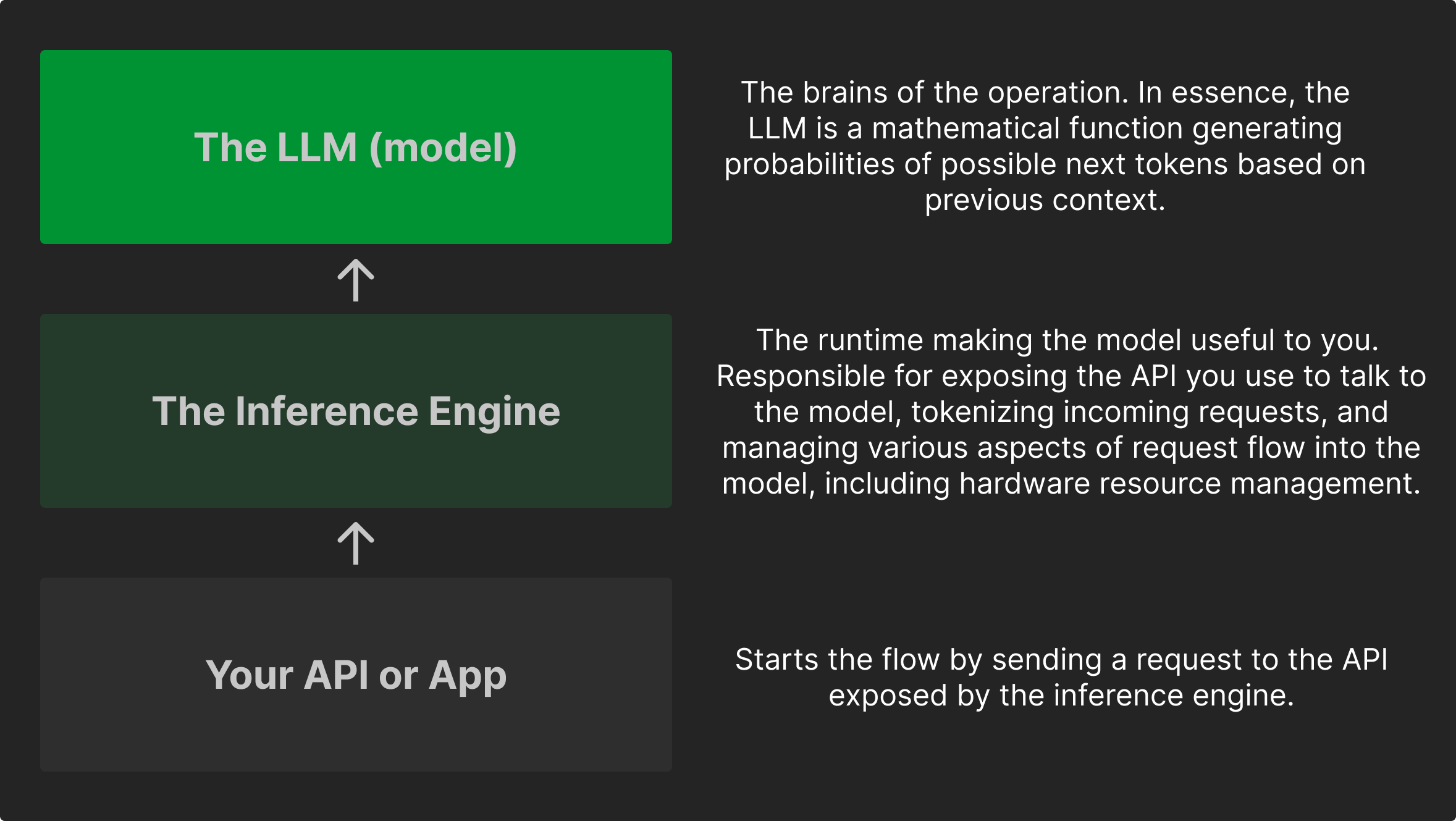
From this, we can draw a few conclusions:
- The model is largely independent from the inference layer. You should pick the model which predicts tokens in the way that best matches your needs, and be able to swap and experiment, even across different providers.
- Models differ in a number of ways, which can heavily influence their performance on different tasks. We’ll get into this in a minute.
- The inference layer is doing the most of the heavy lifting in terms of actually integrating with your software. If you want to deploy an LLM in production, your choice of inference layer will probably impact your architecture more than anything else. Thankfully, most commonly-used options follow similar standardized structures.
Knowing this, let’s dive into step one of an open-source AI stack; the model itself, and how to select one for your use case.
Open-source models: a land of (incredibly confusing) opportunity
When it comes to models, there are a few things to consider. If you’ve used products from the large AI providers, you will most likely have used propriety, closed-source models, which are usually offered only in a few (frequently changing) versions, or with various different levels of “intelligence” being branded (such as Anthropics Haiku < Sonnet < Opus).
In the open-source world, the world is your oyster, which is both amazing and incredibly overwhelming. If you’ve never tried it before, browsing a list of models is basically digesting a word salad of acronyms and numbers. In a moment, we’ll break down the attributes of an open-source model, and more importantly, which parts of all of this information you might care about.
But first, the question on everyone’s minds:
Can open-source models keep up with the large closed-source providers?
Most people have probably had the majority of their LLM experience with the big closed-source providers (OpenAI, Anthropic, Google, Microsoft). And while these models are impressive, the open-source model ecosystem has improved drastically alongside the so-called “frontier” models, to the point where many open-source models are genuinely competitive for real-world production workloads. And even if they weren’t, I might be daring enough to wager that using the most advanced model possible is not on the list of primary concerns for your company’s AI integration (or at least it probably shouldn’t be).
Instead, open-source models offer you a choice, and puts you in control of choosing the right model (with the right hardware) for the right job; something we’re quite used to having control over in traditional software engineering. And that’s pretty neat.
Model attributes: selecting a model for your use case
In the sea of attributes models can carry, this is the list I usually follow when selecting an open-source model:
1: Modality: What type of data does it need to handle? When choosing a model, the first step is to decide what you want to use it for. Do you need text-generation? Image? Audio? This is called the model’s modality, and models can either be specifically trained for one medium, or be multimodal, handling multiple mediums.
2: Capabilities: What task does it need to do well? A model comes with certain capabilities, which is essentially a list of tasks that the model was trained to be good at.
This can include things like:
- General conversation: natural dialogue, questions and answers
- Tool-calling: using LLM tools like calling APIs, searching the web or reading files
- Coding: writing, explaining, and debugging code
- Reasoning and problem solving: logic-heavy tasks and structured thinking
- Large context handling: working with long conversations, documents or the like
- Domain specialization: models tuned for legal work, medicine, biology etc.
Capabilities are important to consider; models which weren’t trained to support tool-calling will often simply output tool calls as text rather than executing them. And if you’re e.g. interested in building a coding agent, selecting a model optimized for coding can be much more impactful than e.g selecting the largest model you can run.
This brings us to:
3: Model size: How much hardware do I need to run it? Model sizing is usually measured in parameters, the internal numerical probability settings the model carries in its training data. A larger model isn’t always better, but in broad strokes, more parameters means stronger performance and more sophisticated reasoning, but also heavier hardware requirements (and often slower execution).
A tricky part of model sizing is to try and figure out what fits in your hardware’s memory (VRAM for GPUs).
Many things outside of the model itself can affect hardware requirements, but as a rough rule of thumb, 7B–32B models are usually within a realistic range for consumer hardware (like a solid Macbook), and can handle many real-world tasks. If you’ve got a high-end consumer GPU like an RTX5090, you might be able to run models in the 32B-70B range. Many cloud providers also offer access to servers with RTX cards.
Beyond this, you’ll usually be looking into larger cloud setups with GPUs like the h100, at which point I’d recommend looking at your favorite provider and what they offer.
Another point to consider on model sizing, is quantization; the process of reducing the precision of a model’s parameters, which can reduce hardware requirements. Generally speaking a quantized 4-bit model can run on much lighter hardware than a 16-bit version of the same model, at the cost of performance.
If I were to recommend some models I have used and liked, I would suggest looking into the following (all of which are available on Ollama and Hugging Face):
- Qwen3.5, solid for general tasks, comes in many sizes and supports tool-calling
- Whisper, a great open-source speech recognition model, which can be used for transcribing audio into text
- qwen3-embedding, a great small-to-medium size model for generating vector embeddings, which can be used for semantic search and retrieval-augmented generation (RAG)
Hopefully, this will help you select a model, so let’s move on to how we actually interact with the model; the inference engine.
Inference Engines
As described above, the inference engine is the runtime of the model which exposes the API we can use to communicate with. There are quite a few popular inference engines out there, optimized for various setups. To keep it simple, I will offer two main contenders here, which I have personally used and liked, and which I think are good for different use cases:
-
Ollama: Probably the easiest way to get started. Ollama runs like a server on your machine, and can both download and serve models, which you can integrate with via API.
- Ollama is technically speaking its own layer on top of an inference engine (llama.cpp), but it handles everything we will need to serve a model out of the box.
- Ollama can serve multiple models at once, meaning you can invoke different models for different requests
- Ollama works across multiple OS’s and architectures, and helps you manage your models and inference in a pretty user-friendly way.
- The main downside is that Ollama handles concurrent requests by queuing them, meaning it could severely bottleneck you in a concurrent production system.
-
vLLM: A high-performance inference engine optimized for concurrency in production environments.
- vLLM uses a combination of techniques to optimize inference speed and resource utilization, such as dynamic batching, memory optimization (KV-caching) and efficient scheduling.
- While this is very neat, the KV-cache takes up memory (scaling with context-length and batch size), meaning that you might end up having less memory for the model itself
- vLLM traditionally only supports one model per instance, meaning you will need multiple instances with a router if you want to serve multiple models, which adds complexity to your architecture.
- vLLM was made to run on Linux. I have personally run vll-metal on my Mac using MLX (appl-optimized model format), this is another place where vLLM’s complexity shows
- vLLM uses a combination of techniques to optimize inference speed and resource utilization, such as dynamic batching, memory optimization (KV-caching) and efficient scheduling.
Generally speaking, if you’re building something where concurrency won’t be relevant, or if you’re just looking to experiment with open-source models and get a feel for how they work, Ollama is probably the best place to start.
If you’re looking to build a multi-user production system, vLLM is probably the better choice, but be prepared to spend some time on model-selection and optimization.
Both of these inference engines support downloading and serving models from their CLI, so you can experiment with different models and see how they perform on your hardware.
Putting it all together
Armed with a model and an inference engine, we actually have everything we need to start working with an open-source model. All that is left is running it, and communicating with the inference engine’s API.
As an example, we can serve a Qwen3.5 9B model using Ollama as the inference engine in the following way:
# Run Ollama on this machine (localhost:11434 by default)
ollama serve
# Download our model
ollama pull qwen3.5:9b
We now have an API running on our machine, which we can call via e.g curl or Postman, and which will return responses from the requested model.
The basic API structure follows the OpenAI API standard of v1/chat/completions, which most inference engines implement (with slight behavioural variations).
This also allows you to swap out inference engines without changing your API calls, which is pretty neat.
curl -X POST "http://localhost:11434/v1/chat/completions" \
-H "Content-Type: application/json" \
-d '{
  "model": "qwen3.5:9b",
  "messages": [
    {"role": "system", "content": "You are a helpful assistant."},
    {"role": "user", "content": "What is the airspeed velocity of an unladen swallow?"}
  ]
}'
// Result: some LLM response that is sure to be full of humor, wit and/or bird facts
And that’s it; you now have a fully functional open-source LLM running on your machine, which you can experiment with and integrate into your applications. All without any API keys or third-party involvement.
This is of course only the beginning though; in production, this expands quickly into retrieval, routing, and observability layers, among others. But it’s a solid foundation to build on, and hopefully gives you the confidence to start experimenting with open-source models and inference engines on your own.
Conclusion & next steps
This blog post outlined the anatomy of an open-source AI stack, and while I won’t pretend that your first experiment will immediately result in you never needing ChatGPT or Claude Code again, it hopefully demystified the process of working with open-source models to the point where you can get started on your own, throwing larger models and more hardware at it as you go.
However, you are not alone in this journey, and there is no need to reinvent the wheel for your own open-source AI project (unless you want to of course, which is a perfectly valid reason to build something).
Much like the models themselves, the open-source ecosystem offers a plethora of software stacks built on top of open-source models, using the elements described above. The first solution many consider, is a private/boxed-off ChatGPT-like experience, which is exactly what the amazing people at OpenWebUI have built. OpenWebUI is a chat UI with all the bells and whistles you can imagine, built to interact with an inference engine - it can even ship with Ollama baked into it.
Or maybe you’re dreaming of your own personal AI assistant, which can learn from you and your data, without sharing it with a third party? In that case, Hermes has got you covered.
Or finally, maybe you want to integrate one or more AI models into your SaaS product on a self-hostable platform which makes it easy to experiment, while also being production-ready and compliant by default, in which case we here at PineGrove would love to help you out. If that piques your interest, you can sign up for our waitlist!
And if your real reason for going open-source is escaping unpredictable usage bills, I wrote about that too — token anxiety and how to reduce it.
Otherwise, stay tuned for more content on open-source AI, and feel free to reach out if you want to talk anything open-source AI!
// Mikkel